Tiquet Free
€0
No time limit
- Receipts, warranties, contracts and reminders
- The household sheet and unusual-charge checks
- Backups and optional iCloud sync
- 5 questions a day per device about free features
Keep contracts, insurance and receipts together. Find the next payment, look up a warranty and get reminders before a deadline. On your iPhone and iPad, without connecting to your bank.
iOS and iPadOS 27 or later · app in Spanish and English; Catalan coming soon
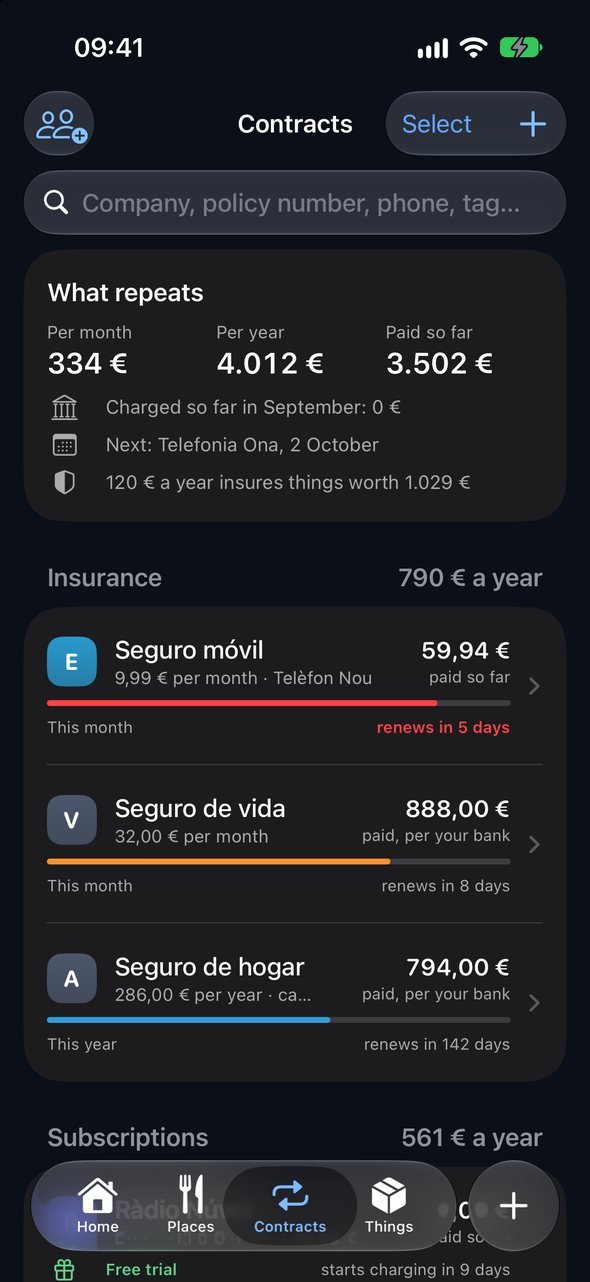
The policy, price and last cancellation date in one card. A reminder gives you time to review the contract.
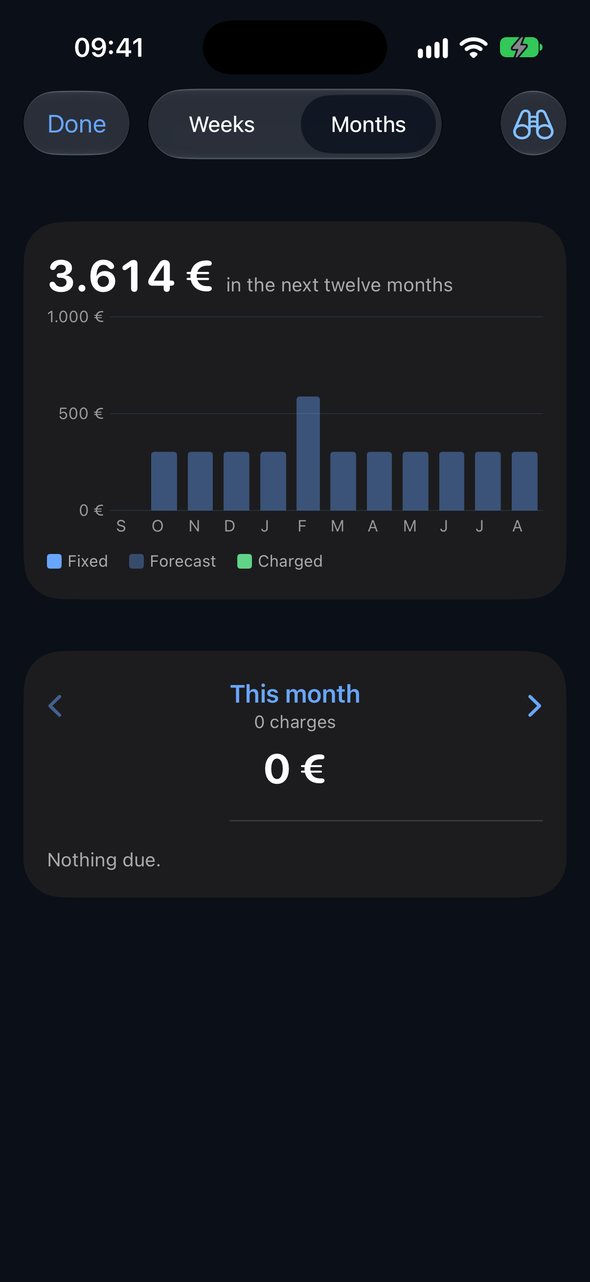
See what is expected and when, based on contracts and previous payments. Forecasts explain what they are based on. Included in Plus.
Keep the receipt and look up the return window or warranty. Keep the original document and check the date that was read.
€0
No time limit
€9.99
Launch price in Spain · one-time payment
No automatic renewal or charge when it ends. Continue with Free and keep everything you saved. The trial is individual; buying Plus is optional.
Family Sharing shares the Plus purchase with up to five family members, subject to Apple’s purchase-sharing settings. Each person keeps their own data: statements, spending and documents are not shared automatically.
Requires iOS or iPadOS 27 or later. Local model features need a compatible device with Apple Intelligence enabled and its model available in the chosen language. Without it, you can save and view documents and use text recognition and rules; some questions and AI features will be unavailable.
The app calculates figures from your saved records; Apple’s model explains them on the device. Check the source documents: readings can contain errors, and future charges are estimates. A question about places may query Apple Maps to locate a place, without sending your amounts or statements.
Conversation and screens use invented data. Answers depend on saved records and Apple Intelligence availability.
The policy they emailed you, the invoice as a PDF, a photo of a receipt, the statement you download from your bank: press and hold, tap Share and pick Tiquet. Up to 20 at once. It is read on the device, and you see what it understood before anything is saved.
 Tiquet📁
Four widgets: the month, the next charge, your insurance at hand the day something happens, and your good places nearby. A Control Centre button to scan a receipt. And Siri, which knows when each contract renews.
One time axis. What you spent, where the month is heading with an honest band, and every charge that is coming. Switch a contract off to see the year without it.
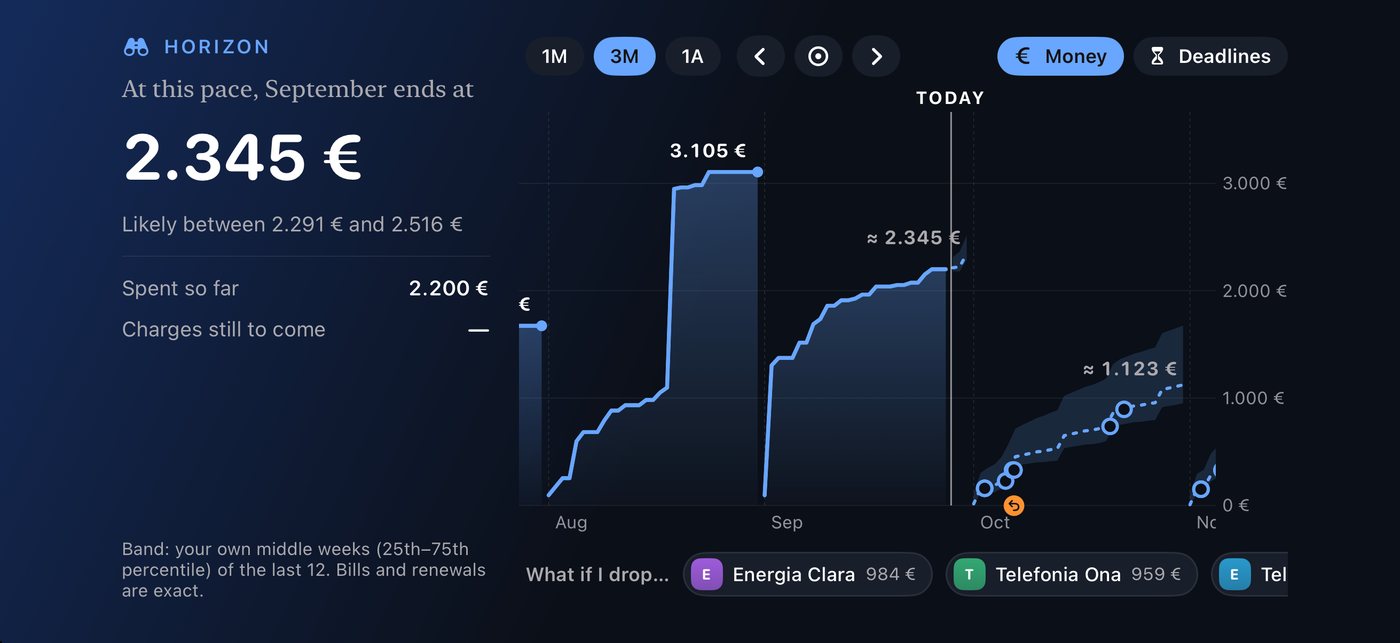
Your financial AI runs on your device. We receive neither your statements nor your amounts: there is no server of ours. Sync through your own iCloud only if you choose; Apple Maps gets an address or a place name when you look one up.
The papers a household needs when one of its adults is not there to explain them. Made on the device, shared only by you.
One PDF with everything the household is signed up to: insurance first, then subscriptions and bills. Company, policy number, who is insured, what it covers, the phone to report a claim, where the login is kept, when it renews. No prices unless asked for; never a password.
ID card, passport, driving licence, the car's inspection, health cards. Which, whose, until when; the number hidden in discreet mode and never on the sheet. Reminded 60 and 15 days before, on the widget and in The Month.
The people of the household are tags: one tap on a contract says whose it is, and “everything of Marta's” is a screen.
Photograph it or share it from Mail. The on-device model reads shop, date, items, return policy and warranty. The photo stays as proof.
Drop a PDF or a photo of a policy: number, premium, what it covers, who is insured and the claims phone are read and checked against the paper.
Download them from your bank and open them with Tiquet: BBVA, Sabadell and more. No login, no connection. Card numbers are cut to their last four digits before anything is saved. Search any shop or word across all of them.
A receipt, its bank line and the contract's premium are one payment. Where there are statements, the statements rule. Two policies with one insurer, yours and your partner's, are two cards with two prices.
If the bank stops showing a charge, Tiquet closes the contract on the last month it was seen, and says so.
Silent rises, protection that has cost more than the thing, a paid warranty the law already gives you, bank fees. Your numbers and the question to ask, with every charge behind each one; never a company, a cover or a cancellation.
Every bank payment gets a tag by itself; one tap classifies the rest, past and future, one payee or many at once. A tag adds up its receipts, its contracts, its things and its bank payments, each counted once. Follow any tag month by month.
Your regulars on a shelf, your trips found by themselves, home's towns at a glance; then each place with its own stars and notes, all its visits, what it has cost and the dishes worth coming back for. Search a name the bank knows and it becomes a place.
Your own iCloud keeps your devices the same, if you switch it on. For the family, one file by AirDrop with contracts and warranties: no receipts, no bank.
One tap turns every amount into •••, for the train or the sofa. The app switcher shows a cover, not your figures.
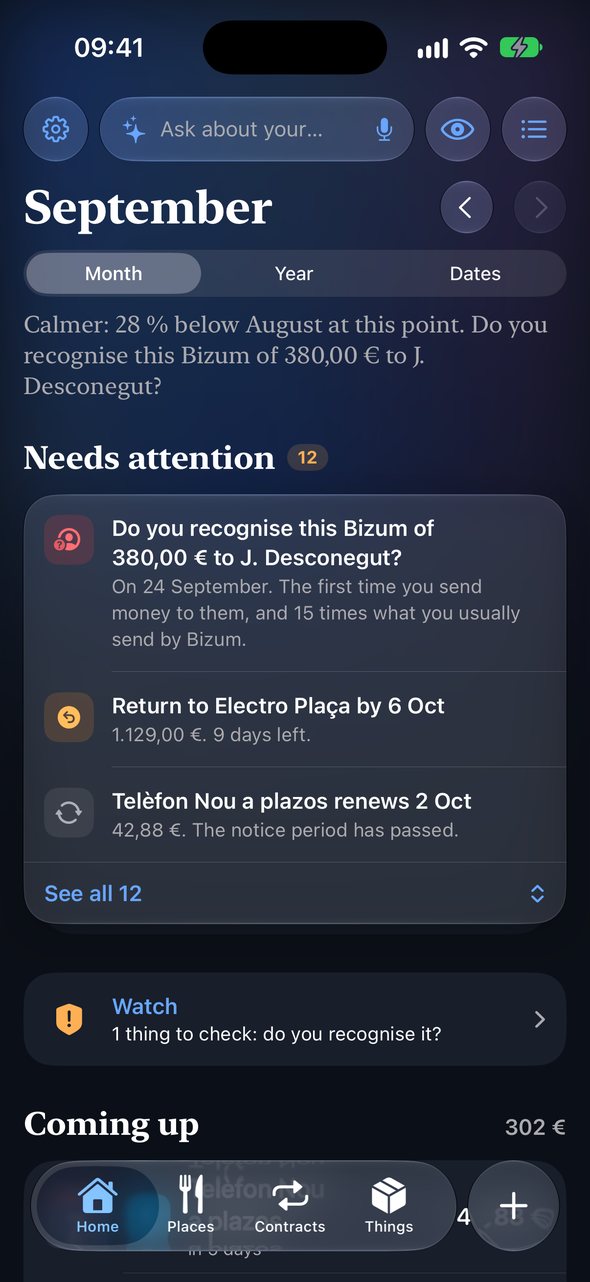
A Bizum to someone new and far above your usual, a transfer to an account never seen, a charge abroad with no trip, a card being tried, a double charge. Tiquet asks if you recognise it, and if not, says what to do now. Worked out on your iPhone; it contacts no one.
What came in against what went out and what was kept, each month. Money moved between your own accounts is recognised and left out; refunds and a friend's Bizum are money given back, not earnings. Each account shows how far its statements go; only the bank and the last four digits are kept.
A trip, a car, a cushion: how much and by when. What you put aside and the transfers your bank shows fill the ring, with what is needed each month to arrive on time.
“Dinner at Can Pere, 42, yesterday” in the question bar becomes a receipt as it will be saved: check it, tap Save. Nothing exists until you do.
Electricity, water, gas: the expected charge is the same month last year moved by this year's drift, never just the last receipt. The card says what is expected and why.
A phone in 24 instalments says “payment 7 of 24, until March 2027” and retires itself after the last one. A free trial counts down to the day it starts charging, with a reminder while saying no is still free.
By merchant, by group, or let the on-device model point at what looks filed wrong. One tap fixes every payment of that merchant, past and future, on every device. Undo is one tap too.
Select contracts, things, bank payments, tags or places and act on all of them: tag, move, merge, cancel, delete. Every delete asks first and says what stays.
Where it is, its phone, its stars and your notes live on the place; every visit, scanned or from the bank, links to it. The next statement goes straight to the right place.
Returns, renewals and warranties as a stack you read at a glance; mark done, or be reminded tomorrow or on Monday, one by one or many at once.
Your saved documents and local calculations remain available offline. Sync, map searches, logos and App Store operations need a connection.
Four weeks behind and twelve ahead. What was spent, then what is coming: your everyday pace, the fixed charges and the bills that go by consumption. The heaviest week is named on top, because that is the one that hurts.
On the 3rd, last month comes out as an issue: a cover, the money drawn day by day, a diary of what happened, where you ate and what you loved, the map, and the household's horoscope: what next month holds, read in your contracts, not in the stars.
Type a contract, or attach its PDF and let the card fill itself.
Download them from your bank as files. Tiquet finds what repeats and offers it as contracts.
The receipt of anything with a warranty or a return window. The rest is optional.
A month before a yearly policy renews: time to compare. Then the last days to say no.
Free includes receipts, warranties, contracts, reminders and 5 questions a day per device about free features. Plus has a €9.99 launch price in Spain, paid once with no subscription, and supports Family Sharing for the purchase. Try Plus free for 14 days with no automatic renewal.
No, and it never will. You download statements as files and open them with Tiquet. It keeps no bank login.
On your device. If you switch on iCloud sync, also in the private database of your own Apple Account, which the developer can't read.
You can save and view documents and use text recognition and rules. The local model needs a compatible device, Apple Intelligence enabled and the model downloaded and available in your language. Some questions and AI features will be unavailable.
No. It shares the Plus purchase, subject to Apple’s settings, with up to five family members. Each Apple Account keeps separate data. To share documents with someone else, explicitly choose to export the household file.
Yes. One .zip with every receipt, photo, policy and movement, plus spreadsheets anyone can open.
No. It reports your own numbers and the question worth asking. It never recommends a company, a cover or a cancellation.
You return to the free features with no automatic charge. Everything you saved stays. Plus features require a purchase; the trial is not shared through Family Sharing.